
VoiceDesk icon

VoiceDesk

A window on my PC where I talk to Claude Code, one project to a tab, and it talks back.

Windows appRuns Claude CodeWorks with BoardView

I'd rather talk than type. VoiceDesk is a window that stays open on my PC. I pick a project, switch on the microphone and say what I want. Claude Code goes to work in that project's folder, and VoiceDesk reads the answer back to me out loud.

It's the other half of BoardView. BoardView is where I decide what gets built. VoiceDesk is where I talk it through with the AI while it builds it.

The window

One tab for each project

Each project on the left has its own Claude and its own conversation. Switch tabs and you pick up where you left off in that project. Across the top: which model is working, how much of my 5-hour and weekly Claude limits I've used, the Auto-allow switch and the speaker switch.

This is the window while Claude was building this page. I've blurred the projects that aren't on this site yet.
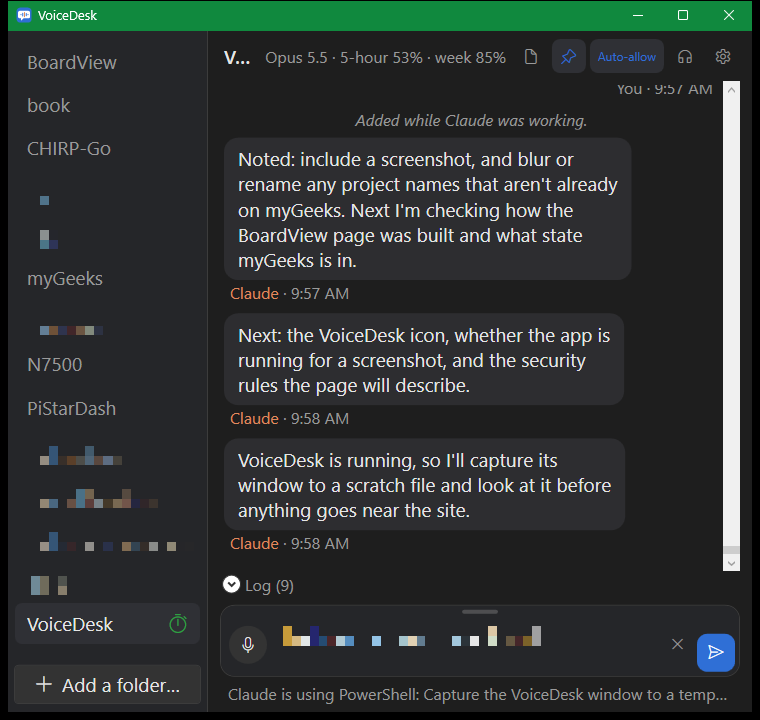
The VoiceDesk window: project tabs down the left with some names blurred, Claude's replies in the middle, and the text box with the microphone and Send buttons at the bottom
With BoardView

How the two work together

My work runs on the two lists from Chapter 15 of The AI Teammate, kept as a board:

  • Every idea goes on the board in Idea. I drag the ones I want into Approved.
  • In VoiceDesk I open that project's tab and tell Claude to go. It builds only Approved cards, and moves the card to In progress.
  • When it's built, Claude moves the card to Testing and writes on it what I should test.
  • I test it. If it works, I drag it to Done. If it doesn't, I drag it back and say what's wrong.

The BoardView hook runs inside VoiceDesk too. Today I dragged a VoiceDesk card to Done in BoardView, and the next thing I said in VoiceDesk arrived with "David moved #34 Testing → Done." Claude started on the merge without my having to bring it up.

Talking

I see my words before they go

The microphone is on only when I switch it on, and a light shows it's listening. Whisper, a speech-to-text model that runs on my own PC, turns what I say into text. The sound is never saved or sent anywhere.

My words land in the text box first. Nothing goes to Claude until I say "send" or press Enter, so I can fix a word it heard wrong.

Listening

Claude reads its answers out loud

Answers are read with a Windows voice. Code and file paths are left out of what it reads, because nobody wants to hear a file path spelled out. I can pause, carry on or stop it with a button or a key, and flip between my speakers and headphones from the top bar.

While it works

Say more while Claude is busy

If I think of something while Claude is working, I say it anyway. The message waits in line and goes when Claude finishes, or I press Send now and it goes in right away.

I can drop a log file or a picture on the conversation and it goes to Claude with my next message. A line under the text box shows what Claude is doing at that moment.

Guard rails

Some things need my click

When Claude Code wants to change something, VoiceDesk shows the question in a pop-up. Anything that could destroy work needs a mouse click. Saying "yes" won't do it. That means deleting or moving files, git commands that throw work away, anything outside the project's folder, and installing software.

VoiceDesk never starts Claude with its permission checks turned off. Auto-allow, a switch on each tab, uses Claude Code's own auto mode with my rules on top, so the dangerous things still come to me. What I say goes to my Claude Code and nowhere else.

Not released

VoiceDesk is my own tool, built for my own PC and the way I work. It isn't for sale or download.

It was set up with Chapter 15 of The AI Teammate, and it works hand in hand with BoardView.